kigadgets.drawing
Module Contents
Classes
Base class of shape drawings, not including text |
|
Base class of shape drawings, not including text |
|
Base class of shape drawings, not including text |
|
Base class of shape drawings, not including text |
|
Base class of shape drawings, not including text |
|
Base class of shape drawings, not including text |
|
Inherits x,y get/set from HasPosition |
|
Layer handling based on strings like 'F.Cu', 'B.Silkscreen', 'User.12', etc. |
Functions
|
Handles anything found in BOARD.GetDrawings |
Attributes
- kigadgets.drawing.wrap_drawing(instance)
Handles anything found in BOARD.GetDrawings Feeds through to shape wrap methods based on the type of shape. It also detects and feeds through text.
- class kigadgets.drawing.Drawing
Bases:
kigadgets.item.HasLayer,kigadgets.item.HasPosition,kigadgets.item.HasWidth,kigadgets.item.Selectable,kigadgets.item.BoardItem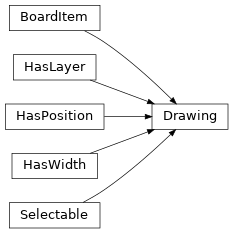
Base class of shape drawings, not including text
- property layer
- property position
- property x
- property y
- property width
- property is_selected
- property native_obj
- property board
- geohash()
- select(value=True)
Selecting changes the appearance and also plays a role in determining what will be the subject of a subsequent command (delete, move to layer, etc.)
- deselect()
- brighten(value=True)
Brightening gives a bright green appearance
- classmethod wrap(instance)
- class kigadgets.drawing.Segment(start, end, layer='F.SilkS', width=0.15, board=None)
Bases:
Drawing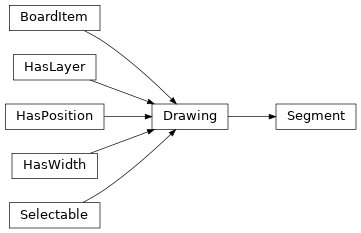
Base class of shape drawings, not including text
- property start
- property end
- property layer
- property position
- property x
- property y
- property width
- property is_selected
- property native_obj
- property board
- geohash()
- select(value=True)
Selecting changes the appearance and also plays a role in determining what will be the subject of a subsequent command (delete, move to layer, etc.)
- deselect()
- brighten(value=True)
Brightening gives a bright green appearance
- classmethod wrap(instance)
- class kigadgets.drawing.Circle(center, radius, layer='F.SilkS', width=0.15, board=None)
Bases:
Drawing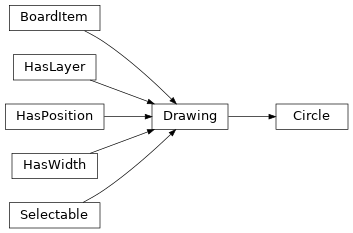
Base class of shape drawings, not including text
- property center
- property start
- property radius
- property layer
- property position
- property x
- property y
- property width
- property is_selected
- property native_obj
- property board
- geohash()
- select(value=True)
Selecting changes the appearance and also plays a role in determining what will be the subject of a subsequent command (delete, move to layer, etc.)
- deselect()
- brighten(value=True)
Brightening gives a bright green appearance
- classmethod wrap(instance)
- class kigadgets.drawing.Arc_v5(center, radius, start_angle, stop_angle, layer='F.SilkS', width=0.15, board=None)
Bases:
Drawing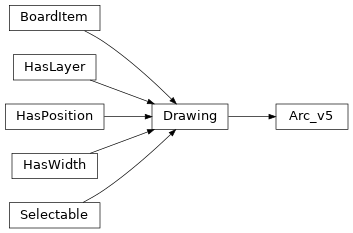
Base class of shape drawings, not including text
- property center
- property radius
- property start
- property end
- property angle
- property layer
- property position
- property x
- property y
- property width
- property is_selected
- property native_obj
- property board
- geohash()
- select(value=True)
Selecting changes the appearance and also plays a role in determining what will be the subject of a subsequent command (delete, move to layer, etc.)
- deselect()
- brighten(value=True)
Brightening gives a bright green appearance
- classmethod wrap(instance)
- class kigadgets.drawing.Arc_v6(center, radius, start_angle, stop_angle, layer='F.SilkS', width=0.15, board=None)
Bases:
Drawing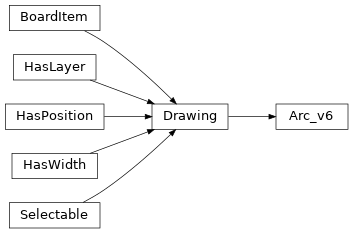
Base class of shape drawings, not including text
- property center
- property radius
- property start
- property end
- property angle
- property layer
- property position
- property x
- property y
- property width
- property is_selected
- property native_obj
- property board
- geohash()
- select(value=True)
Selecting changes the appearance and also plays a role in determining what will be the subject of a subsequent command (delete, move to layer, etc.)
- deselect()
- brighten(value=True)
Brightening gives a bright green appearance
- classmethod wrap(instance)
- kigadgets.drawing.Arc
- class kigadgets.drawing.Polygon(coords, layer='F.SilkS', width=0.15, board=None)
Bases:
Drawing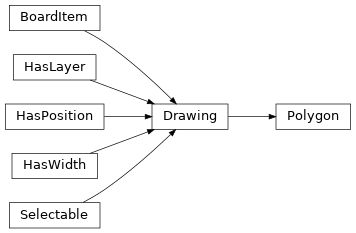
Base class of shape drawings, not including text
- property filled
- property layer
- property position
- property x
- property y
- property width
- property is_selected
- property native_obj
- property board
- get_vertices()
- to_segments(replace=False)
If replace is true, removes the original polygon
- fillet(radius_mm, tol_mm=0.01)
- contains(point)
Does this shape contain the point
- Parameters:
point (tuple, Point) – the point as a tuple or kigadgets.Point
- Returns:
True if contained
- Return type:
bool
- geohash()
- select(value=True)
Selecting changes the appearance and also plays a role in determining what will be the subject of a subsequent command (delete, move to layer, etc.)
- deselect()
- brighten(value=True)
Brightening gives a bright green appearance
- classmethod wrap(instance)
- class kigadgets.drawing.Rectangle(corner_nw, corner_se, layer='F.SilkS', width=0.15, board=None)
Bases:
Polygon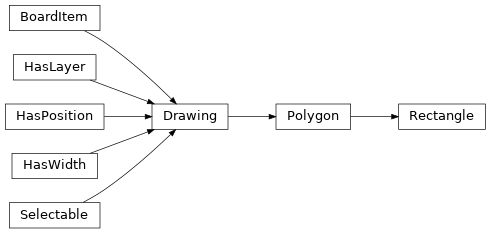
Inherits x,y get/set from HasPosition
- property size
- property filled
- property layer
- property position
- property x
- property y
- property width
- property is_selected
- property native_obj
- property board
- classmethod from_centersize(xcent, ycent, xsize, ysize, layer='F.SilkS', width=0.15, board=None)
- get_vertices()
- to_polygon(replace=False)
- fillet(radius_mm, tol_mm=0.01)
Deletes the rectangle but that is ok in most situations It can be undone IF it is run inside an action plugin
- contains(point)
Does this shape contain the point
- Parameters:
point (tuple, Point) – the point as a tuple or kigadgets.Point
- Returns:
True if contained
- Return type:
bool
- to_segments(replace=False)
If replace is true, removes the original polygon
- geohash()
- select(value=True)
Selecting changes the appearance and also plays a role in determining what will be the subject of a subsequent command (delete, move to layer, etc.)
- deselect()
- brighten(value=True)
Brightening gives a bright green appearance
- classmethod wrap(instance)
- class kigadgets.drawing.TextPCB(position, text=None, layer='F.SilkS', size=1.0, thickness=0.15, board=None)
Bases:
kigadgets.item.HasLayer,kigadgets.item.HasPosition,kigadgets.item.Selectable,kigadgets.item.BoardItem,kigadgets.item.TextEsque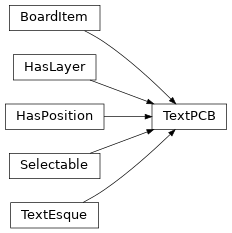
Layer handling based on strings like ‘F.Cu’, ‘B.Silkscreen’, ‘User.12’, etc. If the layer is not present, it will be caught at runtime, rather than disallowed.
- property layer
- property position
- property x
- property y
- property is_selected
- property native_obj
- property board
- property text
- property thickness
- property size
- property orientation
- property justification
- justification_lookups
- geohash()
- select(value=True)
Selecting changes the appearance and also plays a role in determining what will be the subject of a subsequent command (delete, move to layer, etc.)
- deselect()
- brighten(value=True)
Brightening gives a bright green appearance
- classmethod wrap(instance)